Email Marketing Capacity: 192 Authored Send-Allowance Scenarios
How Many Campaigns Fit Your Monthly Email Limit?
Divide the allowance left after automation by recipients per campaign, then round down to whole campaigns. A contact-tier multiplier is not automatically your campaign frequency. The answer changes when a campaign targets only part of the list or automated messages share the allowance.
This original dataset contains 192 authored capacity scenarios, not customer observations or vendor quotes. It combines deliberately chosen audience sizes, campaign frequencies, recipient fractions and automation loads. It does not compare price, inbox delivery, engagement or revenue. No emails were sent to produce it.
The key simplification is visible in every row: the eligible recipient list is assumed to equal the contact tier used to calculate the allowance. Real stored records, marketing contacts, eligible recipients and contracted tiers can differ. Replace that assumption before applying the model to an account.
Download the Dataset and Reproduce the Calculation
Download the rows with their assumptions, not just the chart. Each scenario has a stable identifier, calculated allowance, required sends, remaining sends and a flag showing whether demand fits.
- CSV spreadsheet: filter and compare scenarios.
- JSON dataset: includes provenance, definitions and all 192 rows in its data array.
- JSONL records: one scenario per line for analysis workflows.
- Canonical calculation module: downloadable, dependency-free Node.js reproduction code.
Using Node.js 22 or later, save the module locally and run:
node growth-cost-models.mjs --out ./data
node growth-cost-models.mjs --out ./data --check
The module generates the companion growth-model datasets too; select the email files for this analysis. It performs local calculations without connecting to an email provider or issuing sends. The check command compares generated outputs with the files in the chosen directory. Version 1.0.0 uses exact integer message counts and rounds fractional outputs to six decimal places.
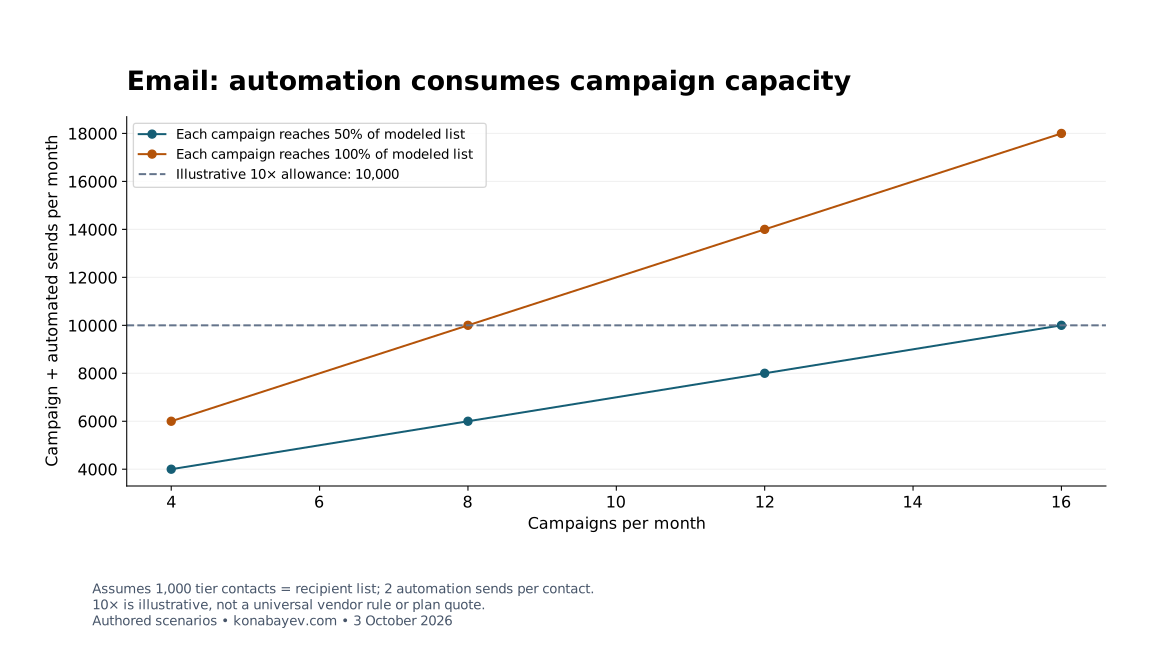
Use the chart as a visual summary. A row marked as fitting is not proof that a corresponding commercial plan is available or that its recipients should receive the planned messages.
Which Inputs Are Verified and Which Are Assumptions?
The multiplier pattern is documented; the combinations in the grid are hypothetical. The official HubSpot Marketing Hub pricing page, checked October 3, 2026, stated monthly email limits of 5× the marketing contact tier for Starter, 10× for Professional and 20× for Enterprise.
That supports those three multiplier values as factual context. It does not establish that every audience size in this dataset can purchase every named plan at a particular price. The rows are deliberately not labeled as eligible HubSpot offers.
| Input | Values in the dataset | Evidence status |
|---|---|---|
| Assumed contact tier and eligible list size | 500; 1,000; 5,000; 10,000 | Author-selected sizes; equality is a simplification |
| Send multiplier | 5×; 10×; 20× | Documented Marketing Hub patterns, applied hypothetically |
| Campaigns per month | 4; 8; 12; 16 | Author-selected schedule |
| Recipients per campaign | 100% or 50% of the modeled list | Author-selected fraction for each campaign |
| Automated sends per tier contact | 0 or 2 | Author-selected total automation workload |
The grid contains 4 × 3 × 4 × 2 × 2 = 192 combinations. Two automated sends per contact is a workload ratio, not a claim that every person triggers exactly two messages. Likewise, a 50% campaign fraction does not require every campaign to address the same half of the audience.
The Formula and a Worked Control Scenario
Budget campaign messages and automated messages separately, then add them against one modeled monthly allowance. With tier size T, multiplier M, campaign count C, recipient fraction F and automated messages per tier contact A:
Allowance = T × M
Campaign sends = T × F × C
Automation sends = T × A
Required sends = campaign sends + automation sends
Remaining sends = allowance − required sends
Maximum total campaigns = max(0, floor((allowance − automation sends) / (T × F)))
The published grid uses positive audiences and recipient fractions. A different worksheet must handle a zero-recipient campaign without dividing by zero. It should also flag when automation alone exceeds the allowance, even though the maximum-campaign output is floored at zero.
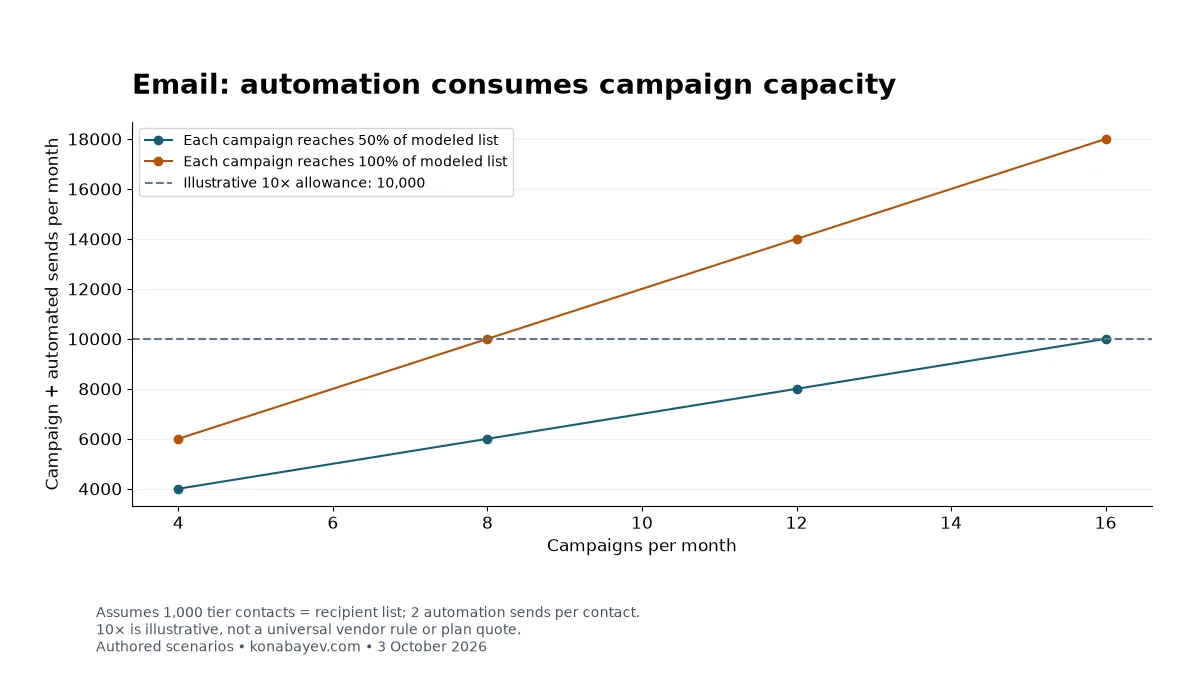
Consider row email-1000-10-12-50-2: a hypothetical tier and recipient list of 1,000, a 10× allowance, 12 campaigns each reaching half the list, and two automated messages per tier contact.
| Step | Calculation | Result |
|---|---|---|
| Monthly allowance | 1,000 × 10 | 10,000 sends |
| Campaign messages | 1,000 × 50% × 12 | 6,000 sends |
| Automated messages | 1,000 × 2 | 2,000 sends |
| Total demand | 6,000 + 2,000 | 8,000 sends |
| Remaining allowance | 10,000 − 8,000 | 2,000 sends |
| Maximum total campaigns after automation | floor((10,000 − 2,000) / 500) | 16 campaigns |
Utilization is 80%. The maximum of 16 means 16 campaigns in total, including the 12 already planned. It leaves room for four additional campaigns at the same 500 recipients each, assuming the automation budget stays unchanged.
Why a Ten-Times Allowance Does Not Mean Unlimited Campaigns
Twelve full-list campaigns exceed a ten-times allowance even before automation. Twelve half-list campaigns may fit because the denominator changes. These statements are arithmetic, not a universal vendor rule or a Klaviyo paid-plan limit.
Keep the same hypothetical 1,000-person list, 10,000-send allowance and 2,000 automated messages. The dataset then gives:
| Campaigns | Audience per campaign | Total sends including automation | Remaining |
|---|---|---|---|
| 8 | Entire list | 10,000 | 0 |
| 12 | Entire list | 14,000 | −4,000 |
| 12 | Half the list | 8,000 | 2,000 |
| 16 | Half the list | 10,000 | 0 |
The negative value is useful: it shows how much demand exceeds the assumed allowance. It is not an overage invoice. Whether the provider stops sends, requires a different plan or applies another policy must be confirmed separately.
A row at exactly zero remaining capacity also leaves no room for forecast error. Before scheduling against it, account for variable audience sizes, unexpected trigger volume and any other messages counted against that same quota. The model does not prescribe a universal safety margin.
A Separate Klaviyo Free-Plan Example
Klaviyo’s checked Free allowance is 250 active profiles and 500 monthly sends; it is separate from this multiplier grid. The official Klaviyo pricing page, checked October 3, 2026, describes active profiles as contacts who may receive marketing emails. Both limits must be respected.
For the complete worked calculation, use the Klaviyo Free-plan example. It applies campaign and automation arithmetic to those two documented limits. That example is outside this 192-row grid, whose smallest hypothetical tier is 500; neither example establishes a universal Klaviyo paid-plan multiplier.
Check Denominators Before Using Your Account Data
Use the provider’s quota definition and your planned recipient counts as distinct inputs. A contact-tier allowance may be based on a purchased tier rather than the exact number of people you can email today. Suppressed, unsubscribed, duplicate or otherwise ineligible records can make a stored-record count unsuitable as a campaign denominator.
For a real worksheet, calculate allowance from the confirmed tier and campaign demand from each planned eligible segment. Sum segment counts across campaigns, including repeated recipients: one person receiving several messages still consumes several modeled sends. Do not deduplicate all monthly recipients and mistake that unique-person count for message volume.
Automations need their own workload forecast. A trigger event is not necessarily one billable message: a journey can branch, skip steps or produce multiple messages. Use historical counted sends where available and document how event estimates become message estimates. The drip campaign guide can help map the journey before assigning its budget.
Confirm how test emails, transactional messages, retries, failed delivery attempts and messages skipped by suppression affect the actual allowance. Their treatment was not established in this source review. This model assumes its counted campaign and automation messages consume one common budget; it does not supply vendor-specific billing classifications.
Quote Checklist, Operational Limits and Responsible Use
A capacity calculation answers whether an assumed workload fits; it does not authorize sending or predict results. Retain permission records, suppression rules and an appropriate campaign schedule. Reducing a modeled recipient fraction is not a reason to reactivate unsubscribed contacts or bypass a provider limit.
Before committing, request written answers to these questions:
- Which product, contact definition and exact tier determine the allowance?
- Does it reset by calendar month or another billing window?
- Which campaigns, automations and other message types consume it?
- Are there daily limits or other restrictions beyond the monthly total?
- What happens near and above the allowance, and when are notifications sent?
- What price, commitment and upgrade terms apply to the confirmed configuration?
The dataset excludes pricing, delivery rate, spam complaints, engagement, conversions and ROI. A capacity pass is not an inbox-placement forecast. Use the email marketing benchmarks guide to check performance definitions separately from quota arithmetic.
If your budget and event tracking disagree across systems, my AI marketing audit service describes a paid diagnostic scope and availability enquiry. Implementation and email-provider charges are separate purchasing decisions. No revenue improvement is implied by this worksheet.
When the same purchase also includes CRM seats and onboarding, use the CRM first-year cost and payment-timing model to separate the recurring commitment, one-time charges and cash due at signing. Its monetary inputs are hypothetical; replace them with the written quote.
Frequently Asked Questions
Are the 192 rows actual vendor plans or customer benchmarks?
No. They are reproducible authored scenarios. The 5×, 10× and 20× patterns have narrow official Marketing Hub support, but audience sizes and workloads are assumptions. No row establishes a quoted product, observed customer outcome or current price.
Why can twelve campaigns fit a ten-times allowance?
They can fit when each campaign reaches only part of the modeled list and automation fits too. In the control scenario, twelve half-list campaigns plus automation require 8,000 of 10,000 sends. Twelve full-list campaigns under the same assumptions require 14,000 and do not fit.
Is the maximum campaign count additional to my schedule?
No: it is the total number of complete campaigns that fit after reserving automation. Subtract the campaigns already planned to find additional capacity at the same recipient fraction. If audiences or automation change, recalculate rather than carrying the old count forward.
Does a negative remaining-send count tell me the extra charge?
No: it measures message overflow only. The model contains no price schedule or overage policy. Ask the provider whether that workload requires a different plan, stops sending or creates a charge before treating overflow as purchasable capacity.
Cite This Model
Tugelbay Konabayev. “Email Marketing Capacity: 192 Authored Send-Allowance Scenarios.” Konabayev.com, October 3, 2026. Version 1.0.0. https://konabayev.com/blog/email-send-limit-model/
Last verified: October 3, 2026. Version 1.0.0 is an authored capacity model; assumptions, exclusions and observed-source scope are retained in the downloads.
Google Preferred Sources
See more of my research in Google
Add Konabayev.com as a preferred source to find more fresh marketing and AI research in Google Search.
Have a relevant product or documented use case? View sponsorship formats and editorial requirements.